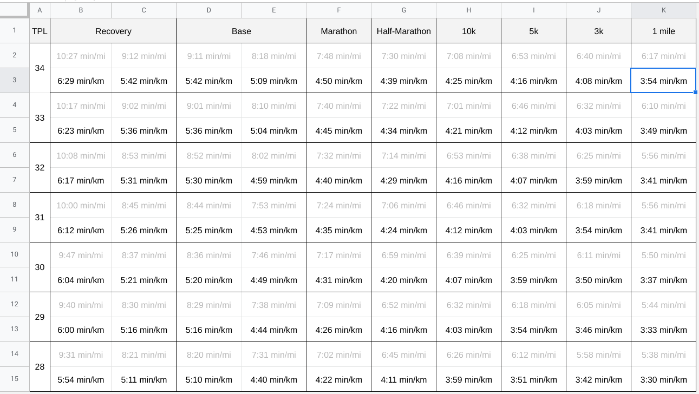
If one of the cells in your sheet reads 7:40 min/mi, use the following formula to produce 4:45 min/km.
=CONCATENATE(FLOOR(((REGEXEXTRACT(A1, “(.*):”)*60+REGEXEXTRACT(A1, “:(.*)”))/1.60934)/60), “:”, TEXT(FLOOR(MOD((REGEXEXTRACT(A1, “(.*):”)*60+REGEXEXTRACT(A1, “:(.*)”))/1.60934, 60)), “00”))
This is a rather lousily tested formula, and when you see a regular expression in a piece of code and no tests, your alarm bells should be ringing. It’s a biased formula, only rounding down. There might be a much smarter, easier way of accomplishing this. You have been warned. Your mileage may vary. Use it at your own risk. I use the formula to guide my training this year. The original pace chart only provided measurements in minutes per mile, but now I can translate these to units that are more easily accessible to me: