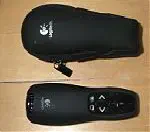
Adobe flash-player in versions 10 and above does not allow keyboard input in online full-screen mode except for certain keycodes (see http://kb2.adobe.com/cps/405/kb405548.html for an explanation). When using, for example, the Logitech Wireless Presenter R400 one might encounter that it does not work with a prezi.com presentation in full-screen mode.
The solution on X-based Linux desktops is to use the tool xmodmap to remap the keycodes that correspond to your “Page Up” and “Page Down” buttons to actions “Left” and “Right”. The following script can be launched in a terminal while running the presentation in full-screen mode:
#!/usr/bin/env bash

echo "Entering presentation mode..."
echo "Modifying xmodmap ..."
xmodmap -e "keycode 112 = Left" -e "keycode 117 = Right"

function reset() {
    echo "Resetting xmodmap ..."
    xmodmap -e "keycode 112 = Prior" -e "keycode 117 = Next"
    exit
}

trap reset SIGINT SIGTERM

while :
do
    sleep 60
done
You might need to find out which keycodes belong to your “Page Up” and “Page Down” buttons on the keyboard by starting tool xev and adapt the script to your system.