9. Februar 2026
Virtualizing the Controllers
 A little quest to get every single button on my throttle quadrant to work with GeoFS, the browser-based flight simulator. A quest that not only taught me a little bit about evdev in Linux, but also led to many more quests later on.
This article is part of a series on my curiosity-led journey through flight simulation, modeling, navigation & mapping, aviation, control theory, software engineering, and more.
GeoFS is a flight simulator running in the browser (www.geo-fs.com). You open the browser, click Fly. It provides a simplified experience, and it is fairly accessible. How did I end up reverse-engineering parts of it?
Well, I had just purchased a throttle quadrant in order to better control airspeed on my attempts to land a plane in the simulator (see Controls, Yours Or Mine?). This throttle quadrant consists of a throttle lever, a second lever, a few push buttons, and a few switches.
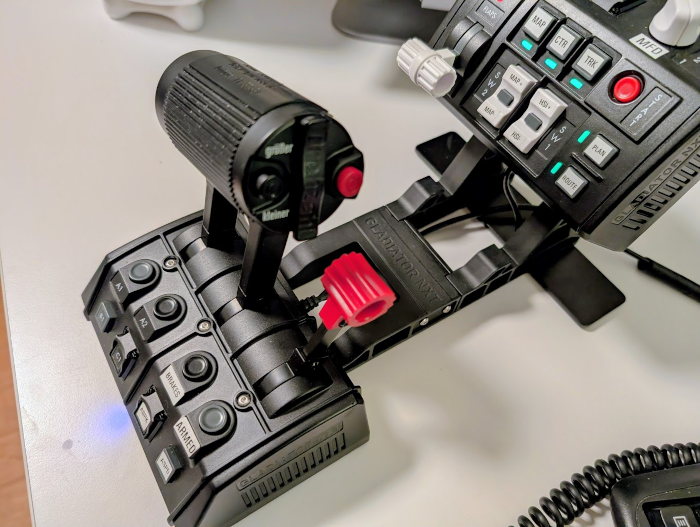
When you open GeoFS in the browser, GeoFS recognizes plugged the devices such as the joystick, the rudder pedal, the throttle quadrant. GeoFS lets you customize the mapping of the buttons and axes to actions. For example, you can map the throttle lever to control thrust, and map the small lever to control the airbrakes. You can map buttons to turn the engines on/off, and so on. Pretty convenient.
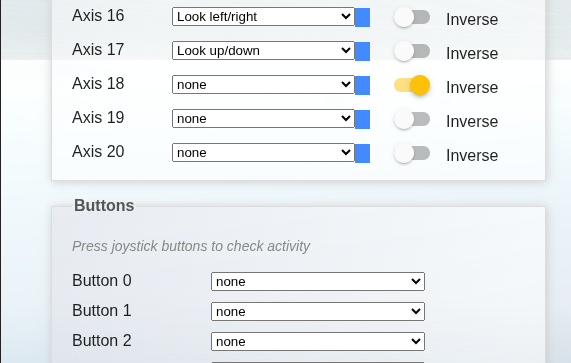
However, for one reason or another, GeoFS would not recognize the buttons attached to the throttle lever itself. Of course, I needed to fix that. Of course, it took a while to fix. Of course, this led to new problems—for those of you engaged in software engineering, I expect that you nod knowingly at this point.
At first, I thought I would be able to download some software and try to remap the buttons that would not be recognized by GeoFS. However, most of the Linux software I found was more geared towards reconfiguring keyboards. So, I decided to write my own. When I tested the throttle quadrant with evtest (a tool to debug input devices in evdev, a input event interface in the Linux kernel), the buttons on the throttle lever showed up just fine!
$ evtest /dev/input/event10Testing ... (interrupt to exit)
Event: time 1770671430.725057, type 4 (EV_MSC), code 4 (MSC_SCAN), value 90026
Event: time 1770671430.725057, type 1 (EV_KEY), code 725 (BTN_TRIGGER_HAPPY22), value 1
Event: time 1770671430.725057, -------------- SYN_REPORT ------------
Event: time 1770671430.801072, type 4 (EV_MSC), code 4 (MSC_SCAN), value 90026
Event: time 1770671430.801072, type 1 (EV_KEY), code 725 (BTN_TRIGGER_HAPPY22), value 0
Event: time 1770671430.801072, -------------- SYN_REPORT ------------If I can read the button events with evdev, maybe there is a way to pass on those events to GeoFS? There is: python-evdev is a library for reading and writing input events on Linux. You have just seen how to read events from a physical device plugged into the computer, in the example with evtest. Yet, it is also possible to create (virtual) devices in evdev.
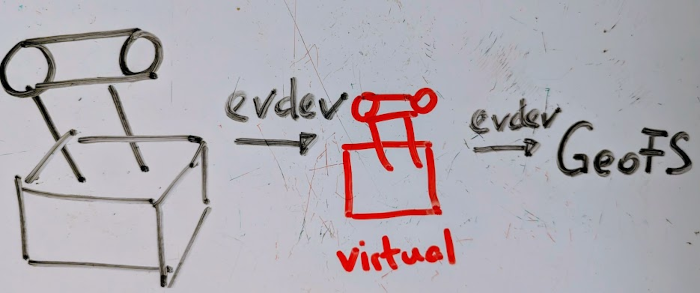
The idea? Create a virtual controller that GeoFS recognizes, so that I can have any button event sent to GeoFS, whenever I want it. Read from the physical device, remap the buttons, and emit events to GeoFS. And it worked. After a decent amount of tinkering, of course. Problem solved.
physical device -> evdev -> server -> evdev -> GeoFS
At some point, however, I discovered that GeoFS was scriptable. As far as I know, the source code is not in the open, but its Javascript API is not entirely obfuscated either. So you can open the Developer Console, and explore the API. Reverse-engineering is not that hard: you come up with an educated guess what something does or stands for, you try to see whether the guess is right or wrong by experiment, and then you discover new questions to ask.
export type GeoFSAnimation = {
  values: {
    altitude: number
    aroll: number
    atilt: number
    geofsTime: number
    groundContact: number
    haglFeet: number
    heading360: number
    kias: number
    loadFactor: number
    slipball: number
    stalling: boolean
    verticalSpeed: number
  }
}
Later, I discovered that someone already reverse-engineered GeoFS before, and indexed the API in github.com/gpsystem/geofs-types. More thoroughly than I had done. The API offers far more options than what GeoFS lets me configure visually by mapping buttons to actions. Promising.
Is it possible to pass the inputs (push button, move axis left, move axis right) directly to GeoFS, without having to create a virtual device in evdev? Yes, but it was not straight-forward. In essence, you can control pitch, roll, yaw by invoking respective methods on the API:
controls.axisSetters.pitch.process(0.2)
controls.axisSetters.roll.process(0.15)
controls.axisSetters.yaw.process(-0.02)
You can also do fun stuff like this—fun fact, I switched the runway lights on/off on an international airport once—
geofs.runwayLights.turnAllOn()
Anyway… When I move the stick a little bit to the left, how to make this event travel all the way from the stick to the GeoFS application running in the browser such that the aircraft rolls to the left?
I opted for continuing the approach of reading the device events with evdev in the little server application, unconstrained by any limits that the the browser environment might impose.
In practice, I might move the stick to the left, and evtest records events values like this:
Event: time 1770675000.094303, type 3 (EV_ABS), code 0 (ABS_X), value 1975
Event: time 1770675000.094303, -------------- SYN_REPORT ------------
Event: time 1770675000.098267, type 3 (EV_ABS), code 0 (ABS_X), value 1976
Event: time 1770675000.098267, -------------- SYN_REPORT ------------
Event: time 1770675000.102272, type 3 (EV_ABS), code 0 (ABS_X), value 1977
The neutral position corresponds to 2047, smaller values indicate left, larger values indicate right. In contrast, GeoFS expects values between -1 and 1 when processing pitch. The server application on localhost reads these values from evdev whenever the stick is moved. How to pass the input to GeoFS in the browser? Through a websocket, connected on one end to the server, and on the other end to a little Javascript application (the “client”) injected with Tampermonkey into the GeoFS page in the browser. In a nutshell:
physical device -> evdev -> server -> websocket -> client -> GeoFS
Recap. The stick is moved to the left. The server reads, say, value 1975 using asynchronous I/O, then sends it through the websocket to the client. The client processes the input, normalizes the input, applies a dead zone, applies the desired sensitivity curve—and depending on such calibration—invokes process(0.035) on controls.axisSetters.roll in GeoFS.
This yields a high degree of control over the inputs from the physical device with evdev on the server-side, and a high degree of control on what do with those inputs in GeoFS on the client-side—the best of both worlds.