23. Februar 2026
Where is the Runway?
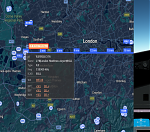 Can’t spot the runway in GeoFS, the browser-based flight simulator? I fixed it by extending GeoFS with Google Maps, showing thousands of airports, as well as the extended centerline of the runway at the destination on the map.
This article is part of a series on my curiosity-led journey through flight simulation, modeling, navigation & mapping, aviation, control theory, software engineering, and more.
Whenever I had the luxury of getting on a flight, I wondered how the pilots managed to find their destination. The plane needs to start descending well before the runway is in sight. Once the plane is closer, low clouds might prevent the pilots from spotting the runway. Where is the runway?
Without getting too entangled with how real pilots solve such navigation problems in real aircraft, I decided to replace the integrated map in GeoFS by a Google Map. On this map, we can show thousands of airports, ten thousands of runways, and more than a hundred thousand navigation aids shipped with GeoFS. Then extend the centerline of a runway as a guide towards the destination.
My mind wanders back to when I visited to the Time and Longitude Gallery at the Royal Musems Greenwich in London. The spectacular, hard-to-understand, marine chronometers of John Harrison to solve the problem of determining a ship’s longitude at sea in the 18th century.
How different the 21st century, with three-dimensional maps, satellite imagery, and global navigation satellite systems all available. When was the last time you tried to determine your longitude by observing the stars when, say, going for a run? A runner’s wristwatch nowadays provides accurate time, accurate maps, accurate localization, and navigation features.
With today’s technology available at my fingertips, unlike John Harrison, I do not need to dedicate my entire life to building accurate clocks in order to solve the problem on how to fly the airplane to a particular runway. Still, there were a few interesting problems to solve along the way.
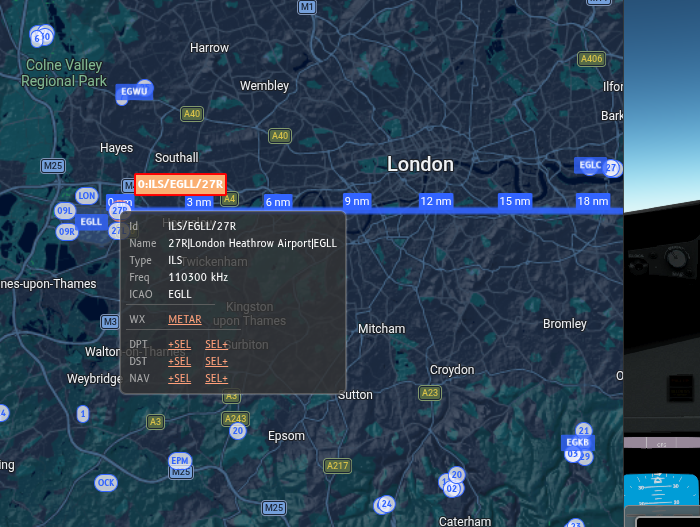
The extended centerline of runway 27R at London Heathrow, drawn on top of a Google Maps widget integrated into the GeoFS browser-based flight simulator. The little blue circles represent runways and other navigation aids, the blue squares mark airports: EGLL is London Heathrow, EGKB is Biggin Hill, and EGLC stands for London City.
GeoFS models over a hundred thousand navigation aids. How to render those quickly without overstretching my laptop, which is already fairly busy running the flight simulator? I did not even try to create a hundred thousand elements—one marker per navigation aid on the map—in the DOM, and see whether that makes the browser tab and/or flight simulator unresponsive.
Instead, I opted for kdbush, a spatial index based on a k-d tree. Insert the 100k+ navigation aids in to the tree. The subset of navigation aids visible on the rectangular map viewport can then be efficiently retrieved from this index, accounting for the wraparound of longitude on the antimeridian. By carefully only creating a marker on the Google Map once a navigation aid enters the map viewport (plus a margin to avoid flickering), and destroying the marker upon exit, this solution is both fast and flexible.
Finally, distance markers on the extended centerline help the eager flight simulator pilot with approaching the runway with the map and cockpit view alone. For a glideslope of three degrees, an airplane needs approximately three nautical miles in order to descend 1000 feet.
$$3~\mathrm{nm} \cdot \tan 3^{\circ} \approx 3 \cdot 6076~\mathrm{ft} \cdot \tan 3^{\circ} \approx 3 \cdot 318~\mathrm{ft} \approx 955~\mathrm{ft}$$
With these distance markers, it is now possible to quickly estimate at which altitude to arrive at the extended runway centerline.